 how-to
Smart Thermostats Without Common Wires: Install Guide
Table of Contents
- Smart Thermostat Compatibility Check Before You Buy
- How to Add a C Wire to a Thermostat When One Is Available
- C-Wire Adapter for Smart Thermostat: When and How to Use One
- Four-Wire Smart Thermostat Installation: Step-by-Step
- Safety Checks for High-Voltage and Line-Voltage Systems
- Comparing No-C-Wire Solutions: Trade-Offs and Best Fits
- How to Verify Power and Troubleshoot After Installation
- Frequently Asked Questions
Last Updated: October 14, 2026
Smart Thermostat Compatibility Check Before You Buy
Installing smart thermostats in homes without common wires is possible, but the right fix for those common wires depends less on the thermostat and more on what kind of heating and cooling equipment you have. A C wire, or common wire, gives your thermostat continuous 24-volt power from the system transformer. Without it, many smart models drop Wi-Fi, drain batteries fast, or refuse to power on at all.
The good news: most systems have a workaround. But before you buy anything, run your system through the decision tree below. The answer changes what you should purchase and how you should wire it.
Thermostat compatibility is the match between your HVAC system's low-voltage control wiring and what a smart thermostat needs to run. Most smart thermostats need a C wire for steady power. Some models work without one, but they cut features to save battery.
System-Specific Decision Tree: Which Fix Fits Your Equipment
Identify your system type first, then match it to a solution. Getting this wrong is the most common reason a no-C-wire install fails.
Conventional single-stage furnace and AC (R, W, Y, G). This is the easiest case. A C-wire adapter works reliably, and so does repurposing a spare wire.
Conventional two-stage or multi-stage systems (adds W2, Y2). Adapters still work, but you must map every stage terminal correctly.
Heat pumps (R, W or O/B, Y, G, plus aux/emergency heat). Heat pumps are the trap. The reversing valve terminal (O or B) must stay connected, and many adapters do not pass it through cleanly.
Boilers and hydronic systems (R, W, and sometimes G for circulator). These often have only two or three wires and no cooling.
Line-voltage systems (baseboard, wall heaters, 120V or 240V). These are not low-voltage and are not compatible with standard smart thermostats. Stop here and see the safety section below.
How to Identify Your Thermostat Terminals and Wiring
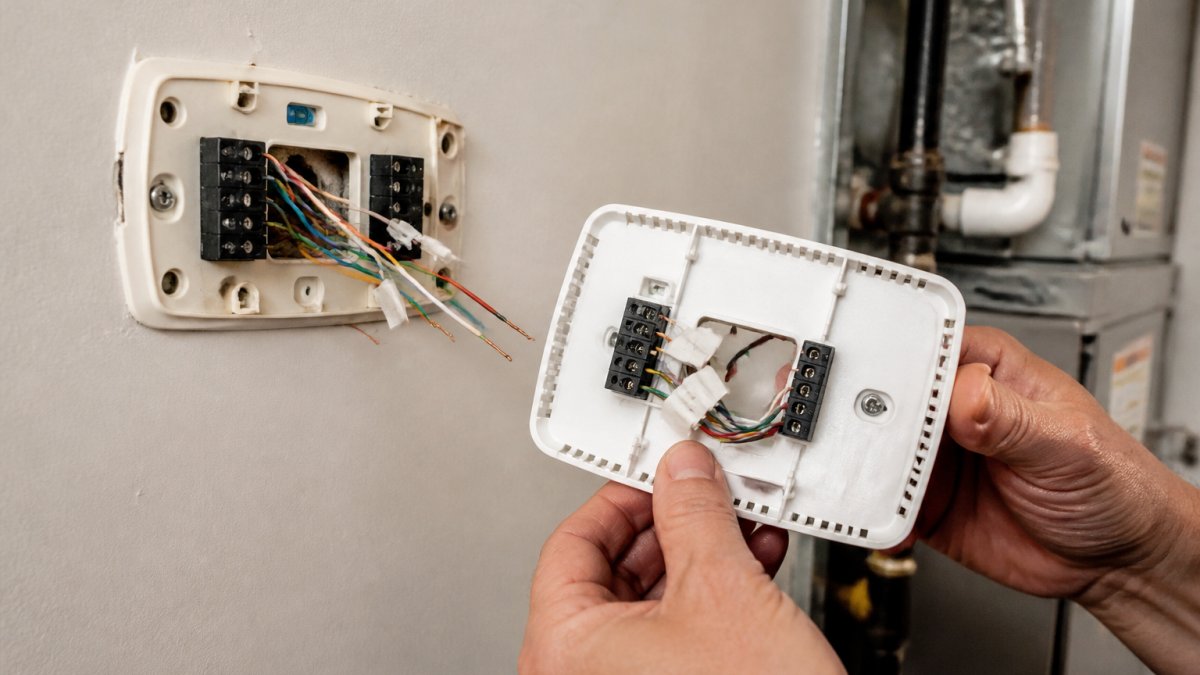
Turn off power at the breaker first. Then pull the thermostat off its base plate and look at the terminals.
You will see letters next to each wire:
- R or Rc/Rh: power from the transformer
- W: heat (W2 for second-stage heat)
- Y: cooling (Y2 for second-stage cooling)
- G: fan control
- O or B: reversing valve on heat pumps
- C: common wire
Snap a photo before you touch anything. The wire colors help, but letters matter more. Wire colors are not standardized, so trust the terminal labels.
Checking for an Unused Wire or C Terminal
Look behind the wall for a wire that is not connected to any terminal. Builders often run extra wires and leave them unused.
Count your wires. If you have five wires but only four are connected, the fifth may be your C wire. Strip the tip and check the control board at the furnace to confirm it lands on the C terminal. If you find a spare wire, that is your answer, skip the adapter entirely.
How to Add a C Wire to a Thermostat When One Is Available
Adding a C wire to a thermostat is the cleanest fix when a spare wire exists. It gives your smart thermostat continuous power and full features.
We recommend this route over adapters whenever possible. It avoids extra hardware at the equipment.
Repurposing an Unused Wire as a Common Wire
Find an unused wire at both ends: the thermostat and the furnace control board. Connect one end to the C terminal on the thermostat base.
At the furnace, connect the other end to the C terminal on the control board. Match the same wire at both ends. Label it so the next person knows what it does.
Connecting the C Wire at the Furnace or Air Handler
Open the furnace or air handler panel and find the low-voltage terminal strip. The C terminal sits next to R, W, Y, and G.
Turn off power at the breaker before you touch the board. Then:
- Loosen the C terminal screw
- Insert your wire
- Tighten the screw
- Tug gently to confirm it holds
Check the U.S. Department of Energy guide to thermostat controls for background on how thermostats manage system cycles.
C-Wire Adapter for Smart Thermostat: When and How to Use One
A C-wire adapter for smart thermostat setups is the right call when no spare wire exists and you cannot run new cable. The adapter borrows power from your existing wires and sends it to the thermostat.
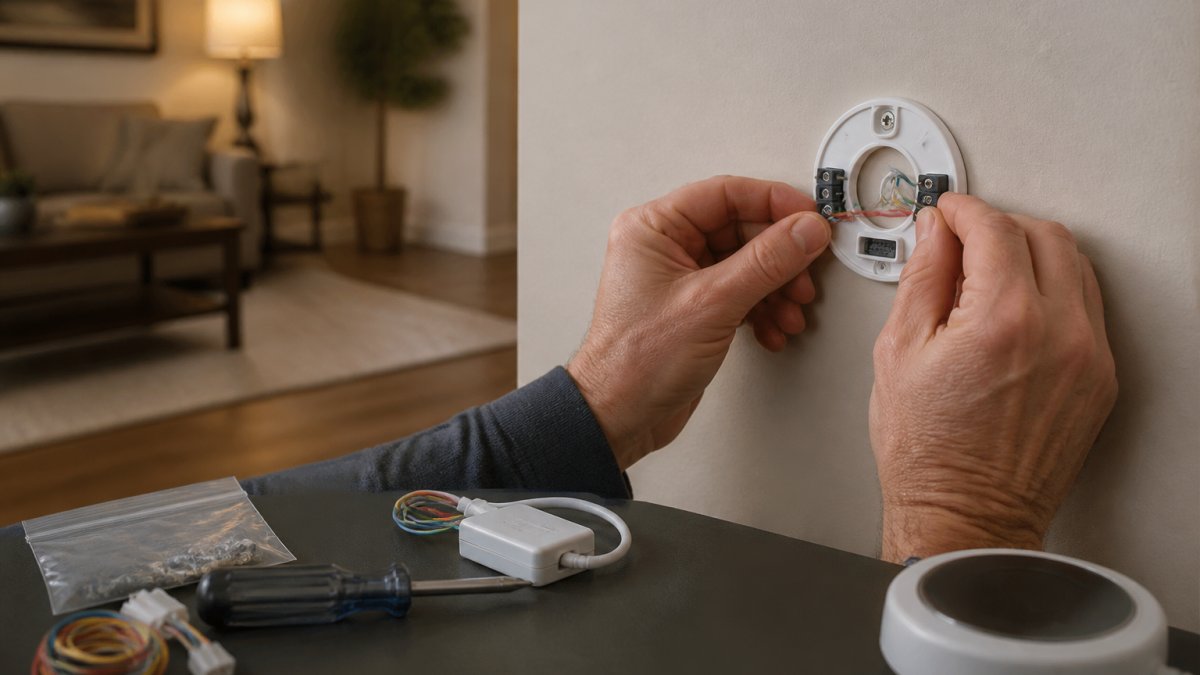
Adapters work with most low-voltage systems. They do not work with high-voltage or line-voltage systems. Check that first.
Terminal-by-Terminal Adapter Installation Steps
Mount the adapter near the furnace control board. Then follow the terminal map:
- Adapter R to board R
- Adapter W to board W
- Adapter Y to board Y
- Adapter G to board G
- Adapter C to board C
At the thermostat, connect the two adapter wires to the matching terminals. Read the adapter's own wiring diagram, since terminal labels vary by brand.
Call (702) 707-4242 for a free estimate →
Four-Wire Smart Thermostat Installation: Step-by-Step
Four-wire smart thermostat installation covers homes with only R, W, Y, and G. This setup needs either an adapter or a smart model built to run without a C wire.
Pick a thermostat rated for four-wire systems. Then work through the steps below.
Wiring the R, W, Y, and G Terminals
Connect each wire to its matching terminal:
- R to R or Rc
- W to W
- Y to Y
- G to G
If your model needs a jumper between Rc and Rh, add it. Mount the base plate level, then snap the thermostat on. Power up and check the screen.
Safety Checks for High-Voltage and Line-Voltage Systems
High-voltage systems use line voltage, often 120V or 240V, and they are not DIY-friendly. These systems power baseboard heaters and some older units.
Look at your old thermostat. If it connects to thick wires with wire nuts, stop. That is a line-voltage setup. Smart thermostats built for low-voltage wiring will not work, and mixing them up can damage equipment or cause a shock.
Comparing No-C-Wire Solutions: Trade-Offs and Best Fits
Every no-C-wire fix has a trade-off. Match the option to your home, your comfort with wiring, and your budget.
| Option | Best For | Trade-Off |
|---|---|---|
| Repurpose unused wire | Homes with a spare wire | Needs access at both ends |
| C-wire adapter | No spare wire, low-voltage system | Extra hardware at furnace |
| Battery-powered smart model | Rentals, simple swaps | Fewer features, battery swaps |
| Professional install | Line-voltage, unclear wiring | Higher upfront cost |
For renters and older homes with hidden equipment, a battery-powered model or a pro install makes the most sense. The ENERGY STAR smart thermostat page explains how these devices cut energy waste.
How to Verify Power and Troubleshoot After Installation
Restore power at the breaker and watch the thermostat boot. Before you trust it, verify power with a multimeter. This is the step most homeowners skip, and it is the fastest way to catch a bad connection before it damages equipment.
Voltage Checks That Confirm the Install
Set your multimeter to AC voltage in the 24V range. With the system powered and the thermostat calling for nothing:
- R to C: expect roughly 24V AC. This confirms the transformer is supplying control power and the C connection is good.
- R to G, R to W, R to Y: each should read near 24V AC when the thermostat calls for that function. If a terminal reads 0V when called, that wire or terminal is the problem.
- C to ground: should read near 0V. A reading above a few volts suggests a floating or miswired common.
If R to C reads well below 24V AC, say 10 to 15V, the transformer may be undersized for the thermostat plus an adapter. That is a common failure on older boilers and furnaces, and it shows up as a thermostat that boots but reboots randomly.
Symptom-by-Symptom Troubleshooting
Blank or dark screen. Check R to C first.
Thermostat boots, then reboots or drops Wi-Fi repeatedly. This is almost always a power problem, not a network problem.
Fan runs constantly. Check the G wire. If G is shorted to R or landed on the wrong terminal, the fan runs regardless of a call.
Heat and cool reversed. On a conventional system, W and Y are swapped. On a heat pump, the O/B reversing valve wire is miswired or was dropped during the adapter install.
Short cycling (system turns on and off every few minutes). This can be a thermostat configuration issue, wrong system type selected in setup, or a power problem causing the thermostat to reset mid-call.
Aux or emergency heat runs when it should not. On a heat pump, this usually means the thermostat is not receiving the outdoor temperature or is misconfigured for the wrong heat pump type.
When to Stop and Call a Professional
If R to C reads 0V, the transformer or control board may have failed, and that is not a DIY repair. If you see scorched wires, smell burning, or the breaker trips when you restore power, stop immediately and call a licensed HVAC technician. The NFPA electrical safety information is a good reminder of why breaker power stays off during any wiring work.
Frequently Asked Questions
Do smart thermostats require a C wire?
Most smart thermostats need continuous power to maintain Wi-Fi and features, and a C wire provides that. Some models can work without one by powering stealing, but this can cause heating or cooling issues. A C-wire adapter or repurposed wire is a safer fix. If you're unsure, a compatibility check helps. For professional help, call RTS Comfort Cooling & Heating at (702) 707-4242.
Can a C-wire adapter power a smart thermostat?
Yes, a C-wire adapter like a power extender kit connects at the furnace control board and uses existing wires to deliver continuous power to the thermostat. It's a reliable solution when no spare wire exists. Installation involves matching terminals (R, W, Y, G, C) and following the manufacturer's diagram. If you're not comfortable working with low-voltage wiring, a technician can install it.
How do you tell whether a thermostat wire is a C wire?
Turn off power at the breaker, remove the thermostat faceplate, and check the terminal labels. The C wire is usually connected to the C terminal and is often blue or black, but color isn't guaranteed. If a wire is connected to C, it's your common wire. If the C terminal is empty, look for an unused wire tucked in the wall. Use a multimeter to confirm 24V AC between R and C.
When should you call an HVAC technician to install a C wire?
Call a technician if you're uncomfortable working with electrical wiring, if your system uses line voltage (high-voltage), or if you can't find a C terminal at the furnace. Also, if you've tried an adapter and still have power issues, a pro can diagnose. RTS Comfort Cooling & Heating offers smart thermostat installation and can handle complex wiring safely.
Sudden thermostat or HVAC failures never wait for a convenient time. When wiring gets confusing or your system needs a real fix, RTS Comfort Cooling & Heating is ready. We handle smart thermostat installation, expert heating and cooling work, and 24/7 emergency service across the area. Call (702) 707-4242 for a free estimate and get reliable climate control back in your home.